On this page
- What are branded keywords?
- Why branded search works as a rough measure of brand awareness
- What branded search can’t tell you
- Where branded search volume comes from
- When your brand name is a poor search term
- When comparing with competitors stops being fair
- How to choose your branded search terms
- What branded search misses about AI recommendations
- How Brandwave counts branded search
- Set your own terms for your brand and competitors
- FAQ
What are branded keywords?
Branded searches can be just the name (“canva”), the name with a product or task (“canva presentation”), common misspellings, or even old names people still use. In SEO and paid search, these are called branded keywords. Teams use them to separate branded traffic from other visitors. Branded keywords attract people who already know you, while non-branded keywords reach those still exploring.
Why branded search works as a rough measure of brand awareness
People can’t search for a name they don’t know. As more people hear about a brand and consider buying from it, more of them type its name into a search box. This makes branded search volume one of the few visible signs of awareness you can track without running a survey.
Branded search has three main advantages. First, it’s easier to access than survey research because you can get search volume estimates from third-party data providers without doing fieldwork. Second, the data covers several years, so you can see your starting point before a campaign. Third, it shows what people actually did, while surveys only show what people say they would do.
Branded search has its limits too. If one person searches three times, it counts as three searches, and all the numbers are estimates. Use it as a steady indicator, but check it against other evidence of brand awareness, like customers telling you how they found you.
What branded search can’t tell you
Many branded searches come from people who already know the brand well. Customers might search the name to log in, get support, check opening hours, or look for a job. This means a brand with lots of customers can have high branded search numbers without actually gaining new awareness.
Some people know a brand but never search for it. They might go straight to the website, open the app, or buy in a store. Brands that people buy out of habit often get fewer searches than brands people are still considering.
A jump in branded searches doesn’t tell you why it happened. News coverage, outages, product recalls, or a competitor’s mistake can all lead to more searches. If searches go up after a campaign, it’s worth checking, but that alone doesn’t prove the campaign caused it.
Month-to-month trends are still useful. If you’re sure a term mostly brings real searches for the brand, keep using the same terms and compare each month. Unrelated searches usually stay about the same, so changes still show if interest is rising, steady, or falling. Issues can happen if you change terms partway through or compare one brand’s numbers with another’s.
Where branded search volume comes from
Most branded search numbers are estimates from third-party search data providers, either used directly or through SEO tools that rely on them. When you look at these numbers, keep three key things in mind.
The numbers are rounded in steps. Once you have more than about 100 searches a month, each step is about 20% to 25% bigger than the last. So, a 25% rise in one month might just be due to rounding, not real growth.
Close variants are grouped together. For example, search data often gives “brand search” and “branded search” the same number, about 12,100 searches a month worldwide, because they are treated as one keyword. However, many people searching “brand search” might just be checking if a trademark is taken, so that number includes searches for different reasons.
Search volumes are monthly averages for the country and language you choose. If a brand sells in just one country, measure it in that country.
Google Search Console measures something different. It counts the searches where your website appeared and how many led to a click. It only covers your site, so you can’t see competitors, but it’s Google’s own count, not an estimate. For many sites, Search Console can also separate branded queries from other searches.
When your brand name is a poor search term
Some brand names are hard to track in searches because the same words have other meanings.
Common words can be tricky. Square is a payments company, but “square” is also a shape, a town square, and appears in many other searches. Search data shows about 2.7 million searches a month for “square” worldwide and about 60,500 for “square pos”. The first number doesn’t show how many people meant the payments company. The Brand Demand Index only counts Square on specific terms like “square pos” and “square card reader”.
Some names are shared with well-known things. Amazon is also a river, and Jaguar is also an animal. For big brands like these, most searches are probably for the company, but some will always be for the other meaning. The Index marks both plain names as moderately ambiguous.
Some names mean something in another field. Asana is both project software and a yoga pose. The Index counts terms like “asana app” and “asana project management” along with the bare name.
Some names only make sense with a qualifier. Away sells luggage, but almost no one searching for “away” alone means the brand. The Index uses terms like “away luggage” and “away suitcase” instead.
Rebrands can affect search terms. TransferWise changed its name to Wise in 2021, but people still search for the old name. The Index keeps “transferwise” in Wise’s terms so the trend doesn’t look like it dropped and then suddenly rose.
When comparing with competitors stops being fair
Share of Search compares your branded searches to your competitors’. It only works well when each brand’s terms are about equally clear.
Take PayPal, Stripe, and Square as examples. “PayPal” is a made-up word, so almost every search for it is about the company. “Square” is a very common word, and “Stripe” is somewhere in between. The Index counts the bare word for Stripe but marks it as moderately ambiguous. If you count just “square”, Square gets credit for unrelated searches, making its share look bigger than it is. If you only count “square pos” and “square card reader”, you miss people who searched just the name, so its share looks smaller. Either way, you should be careful before comparing the three figures.
The same issue comes up if one brand is counted by company name and another by its products, or if one includes a former name and another doesn’t, or if brands are measured in different markets.
The test for every term, for you and your competitors, is simple. Would most people typing it mean this brand? If not, leave it out or add a qualifier, and accept that comparisons will have some error. It’s safer to track how each brand changes over time than to focus on just one month’s ranking.
How to choose your branded search terms
Start with the name as people usually type it, then check each extra term with the same test.
- If your brand name is unique, just using the name might be enough. Also add other common ways people write it, like “pay pal” for PayPal.
- If your name is a common word, combine it with what you sell, like “square pos”, “notion app”, or “away luggage”.
- Only add misspellings if they are common and clearly refer to your brand.
- Include product names if you’re measuring the whole brand, but leave them out if you only want the parent company. Use the same approach for every competitor.
- After a rebrand, keep the old name in your set so the trend continues smoothly across the change.
- Leave out searches that mostly come from existing customers, like “login”, if you want to measure new interest.
Write down which terms you picked and why, and keep them the same. If you change them, update the whole history so every month uses the same set. For more details, see the Share of Search guide, which includes a detailed table for analysts.
What branded search misses about AI recommendations
Branded search tells you how many people already look for you by name. It doesn’t show if an AI assistant recommends you when someone asks for advice. More people now ask questions like “what’s the best card reader for a small café” to ChatGPT, Gemini, or Google’s AI Mode, and the answer lists a few brands.
This changes what it means to have a strong brand. A company that shows up often in AI answers can win customers who never search for its name, so it might do well even if its branded search numbers are low. The opposite can also happen. A well-known brand with lots of branded searches might be missing from AI answers in its category, and its search numbers won’t show the problem. Newer brands that understand how AI answers work can use that gap to overtake market leaders.
Being mentioned in an AI answer, being recommended, and being cited as a source are all different things, and we cover them in another guide. For now, treat branded search as one sign of awareness and check AI answers too.
How Brandwave counts branded search
The Brand Demand Index is Brandwave’s free public index of branded search across different markets and competitor groups. Each brand page lists the search terms used for its figures. We check every term by asking if people typing it mean this brand, and if a name is unclear, we flag it and add more specific terms. The numbers are third-party search volume estimates for the chosen market and language. The Index also tracks which brands are mentioned by ChatGPT and Google’s AI Overviews when buyers ask for advice, but keeps these separate from the search numbers. How the Brand Demand Index is measured explains the method in full.
In your Brandwave workspace, Brand demand starts by using your brand name as the only term until you change it. This works well for a unique name but will overcount if your name is a common word. Until you confirm your terms, a line below the chart shows which term and market are being measured.
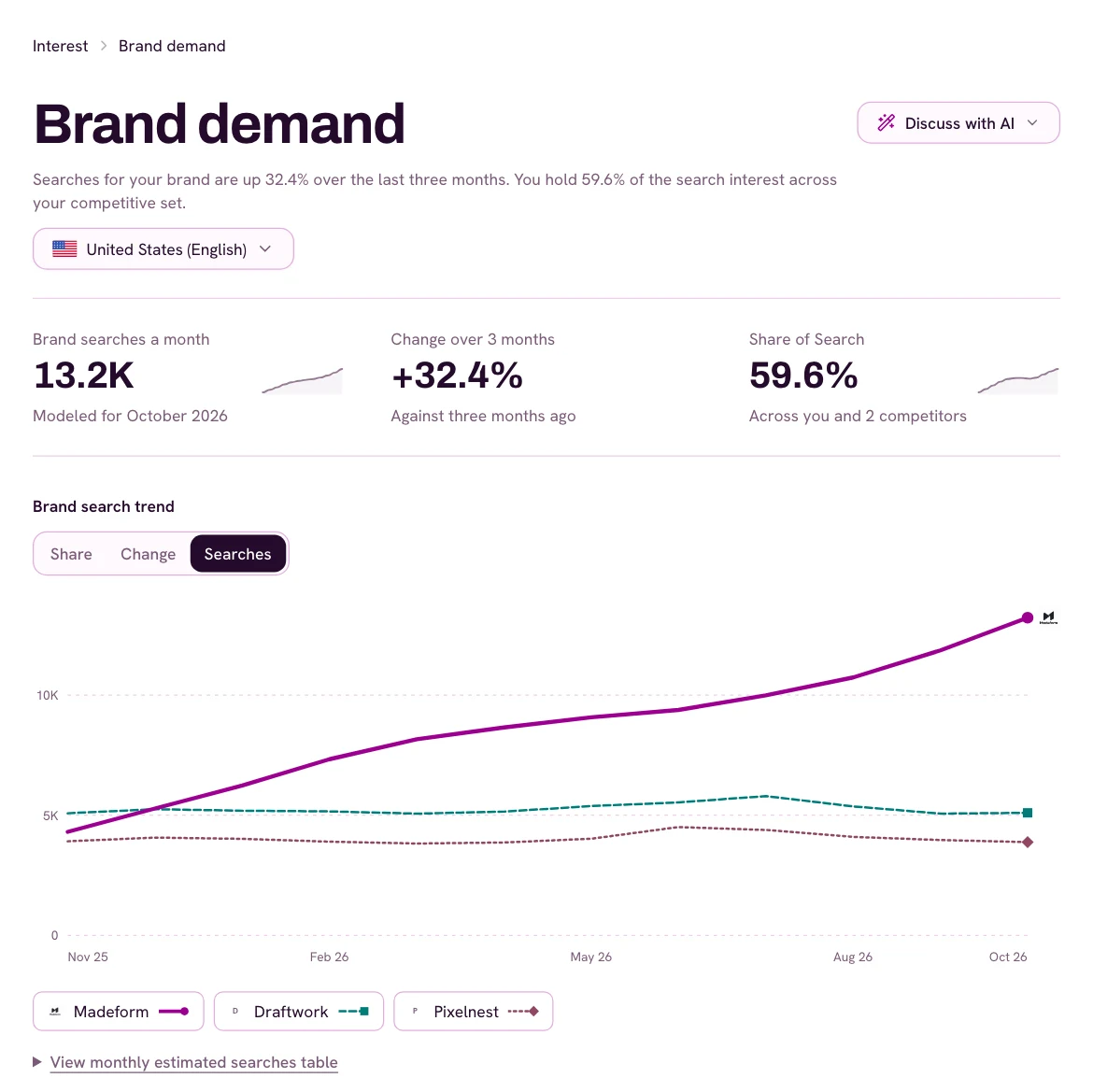
Brandwave only marks a month as a rise in searches for your brand if a typical month has at least 100 searches and the new month is two rounding steps higher, about 56% above usual. Smaller changes are just part of the rounding.
Set your own terms for your brand and competitors
If the Index’s terms don’t fit your needs, or your brand and competitors aren’t included, you can set your own. Create a free Brandwave account, open Brand demand, and choose Manage. There, you can add exact branded terms for your brand, add competitors with their own terms, and pick the market you want to measure.
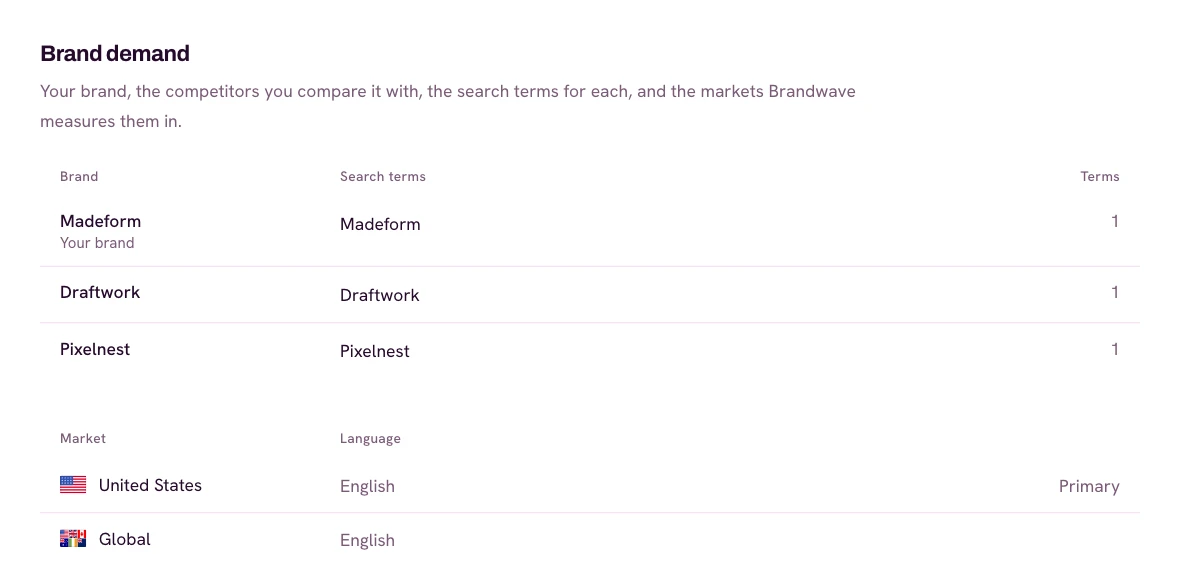
If you choose a competitor the Index already tracks, Brandwave suggests its terms, so you can start with a checked set and edit it. The Free plan covers 5 competitors and 1 market, with no limit on branded terms. Paid plans let you add more competitors and markets.
FAQ
Sources
- Google Search Central: Introducing the branded queries filter in Search Console (developers.google.com)
- Wise: World, meet Wise (TransferWise’s rename to Wise) (wise.com)

Get the next article by email
Drop us your email and we'll let you know when we publish a new article.
By continuing you'll get an email for each new article and occasional product news from Brandwave. Unsubscribe any time. Privacy