On this page
Why creator sales end up credited to organic search
It's easy for your marketing efforts to miss the credit they deserve. Take, for example, a creator encouraging their audience to use your product in a video or a podcast host mentioning your URL. A user may become aware of you and go on to convert to a sale, but without placing a pixel in their browser, most analytics setups will record them as organic search or direct traffic.
Promo codes and tagged links are two clear attribution metrics that survive this gap. When someone redeems a code at checkout or clicks a tagged link, Google Analytics records it against that specific code or link. That gives you a per-creator, per-placement number with clear attribution.
However, promo codes and tagged links also undercount. Plenty of people watch a creator's video, skip the link, and search for the brand days, weeks, or months later. Codes and tagged links only capture the portion of impact that flows directly through them while missing the broader brand awareness you may have built, which is why they work best read alongside self-reported attribution and your overall conversion trends rather than as the whole answer.
What is UTM tracking?
UTM parameters are five query-string fields that Google Analytics reads from any URL a visitor arrives on. UTM stands for Urchin Tracking Module, named after Urchin, the analytics product Google acquired in 2005. Add the parameters to a link and every session that starts from it carries the values you set.
utm_source
- What it records
- Where the traffic came from
- Creator marketing example
instagram,youtube,the-daily-podcast
utm_medium
- What it records
- The type of channel
- Creator marketing example
social,podcast,print,qr
utm_campaign
- What it records
- The initiative the link belongs to
- Creator marketing example
summer-launch
utm_content
- What it records
- The specific creator or placement
- Creator marketing example
maya-rivers-reel-2
utm_term
- What it records
- Paid search keyword (rarely needed here)
- Creator marketing example
- usually left empty
| Parameter | What it records | Creator marketing example |
|---|---|---|
utm_source | Where the traffic came from | instagram, youtube, the-daily-podcast |
utm_medium | The type of channel | social, podcast, print, qr |
utm_campaign | The initiative the link belongs to | summer-launch |
utm_content | The specific creator or placement | maya-rivers-reel-2 |
utm_term | Paid search keyword (rarely needed here) | usually left empty |
GA4 exposes these as session-scoped dimensions such as "Session manual source" and "Session manual ad content". For creator and partner marketing, utm_content is usually where the individual creator or placement lives. Source, medium, and campaign are usually shared across a wider initiative. Ideally, try to be as detailed as possible with these fields because in the long term you'll end up with richer data for analysis.
How to create UTM tracking links
Build each link with Google's Campaign URL Builder or by appending the parameters yourself. A tagged link for a creator's Instagram bio looks like this:
https://yourstore.com/collection?utm_source=instagram&utm_medium=social&utm_campaign=summer-launch&utm_content=maya-rivers
The values are case-sensitive and free-form, so it's best to agree on a convention up front. Instagram, instagram, and IG become three separate rows in every report, and sticking to a convention will help avoid having to manually reconcile these in a report.
- Lowercase everything and separate words with hyphens:
maya-rivers, notMaya Rivers. - One
utm_contentvalue per creator or placement, reused across all of their links. - Keep
utm_campaignconsistent for everything inside the same initiative so you can roll results up. - Shorten tagged links with a redirect you control (a
/go/mayapath on your own domain, or a shortener that preserves query strings). Some shorteners and in-app browsers strip parameters, so click every link once and confirm the UTMs survive to the destination. - Never put UTM parameters on internal links between pages of your own site. They restart the session with a new source and corrupt your data.
The same convention applies more broadly than just creator marketing. A QR code on packaging or a billboard encodes a tagged URL with utm_medium=qr. An event booth gets its own utm_content. Anywhere you can hand out a distinct URL, you can measure the traffic that came from it.
How to set up promo code tracking in GA4
GA4 has a dedicated coupon dimension called "Order coupon" (orderCoupon in the API), and this sometimes trips people up because it stays empty by default. It only populates when your purchase event includes the coupon parameter. If your reports show "(not set)" for every order, check if the coupon parameter is missing from the event.
A purchase event that feeds the coupon dimension looks like this:
gtag('event', 'purchase', { transaction_id: 'T1023', value: 64.00, currency: 'USD', coupon: 'MAYA20', items: [...] })
Where that parameter comes from depends on your tech stack. Most plugins, like Shopify's plugin for Google and Youtube, and Woocommerce's GA4 plugin, send the redeemed discount code automatically. If you have a custom checkout, you'll need a developer to add coupon to the purchase event. Whichever applies to you, verify it the same way by placing a test order with a code applied, opening GA4's DebugView, selecting the purchase event, and confirming the coupon parameter carries the code.
The next step is to make the discount codes themselves attributable. SAVE20 handed to eight creators tells you nothing about any of them. One code per creator, ideally their name or handle (MAYA20), gives the creator something natural to share with their audience and gives you a clean per-partner row in the data. Keep those codes out of your email blasts and paid ads, because the moment a code finds its way onto a coupon aggregator site, its redemptions become less inaccurate for attribution.
Where the data shows up in GA4
Tagged link sessions appear under Reports → Acquisition → Traffic acquisition. The default view groups sessions by channel, so switch the primary dimension to "Session source / medium" and add "Session manual ad content" as a secondary dimension to see individual utm_content values. Redeemed codes appear under Reports → Monetization → Ecommerce purchases with "Order coupon" as the dimension.
Two things to know when reading these reports. GA4 has cardinality limits, so once a report exceeds them, low-volume rows collapse into "(other)", which hits long-tail utm_content values first. And standard reports can lag by 24 to 48 hours, so DebugView and Realtime are the places to verify a fresh setup.
The bigger limitation is that GA4 attribution stops at the discount code or tracking link itself. It can show you that MAYA20 was redeemed 16 times and maya-rivers drove 422 sessions, but it doesn't know those two rows belong to the same person, what her posts cost, which campaign she was part of, or what else was live that week. Answering "was this partnership worth it?" means putting the data somewhere that holds the rest of your marketing picture.
Connect each signal back to the marketing behind it
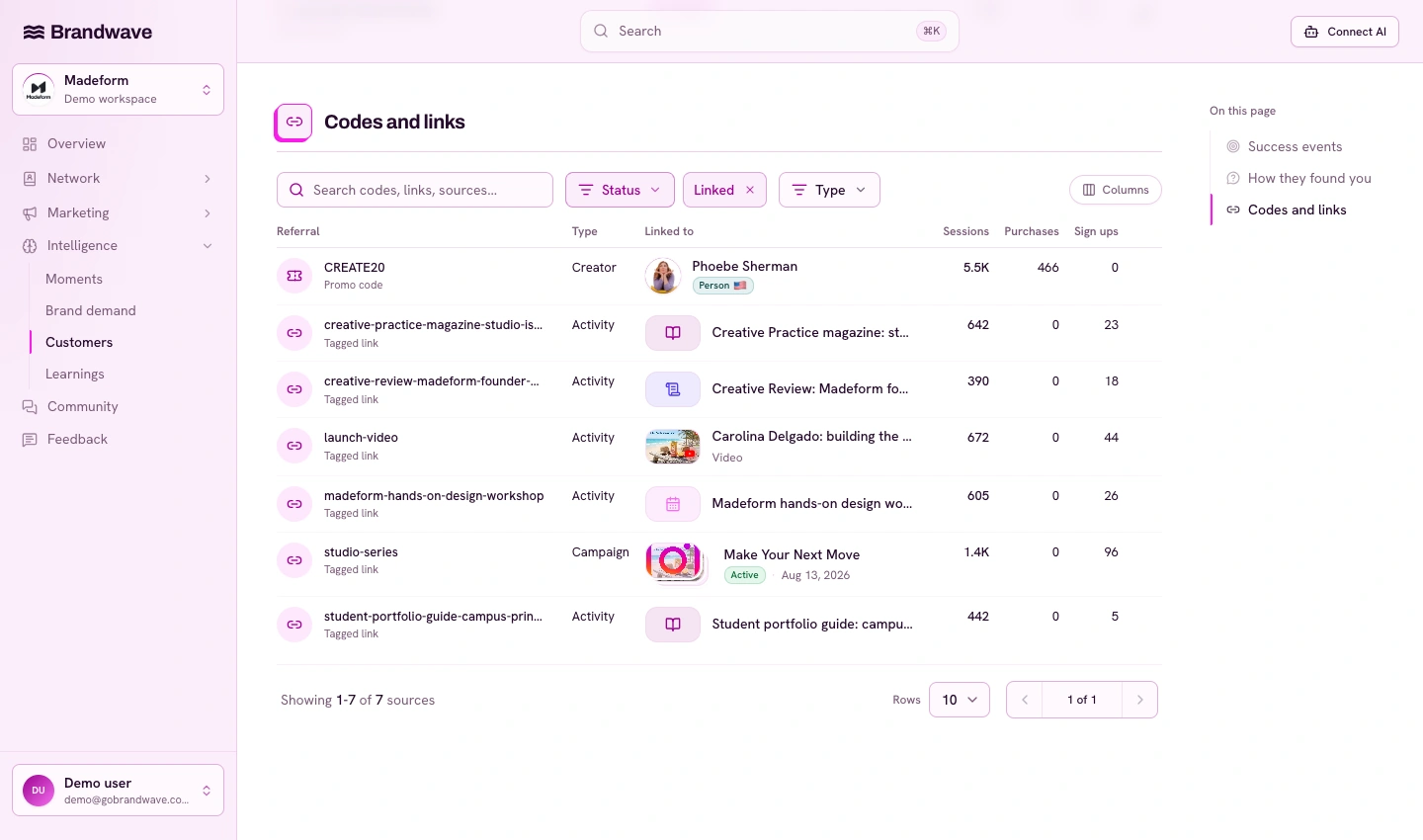
This is the part Brandwave handles. Connect your GA4 property in Workspace settings → Integrations, then open Outcomes → How customers found you. The Promo codes and tagged links section lists the promo-code and tagged-link evidence recorded in GA4, with sessions, users and your chosen outcome events.
From there you map each signal to the creator, campaign, or activity that produced it. MAYA20 and maya-rivers both link to Maya's profile, so her code redemptions, link sessions, content performance, and costs sit in one place instead of three exports. Signals from a podcast sponsorship or a print run map to those activities the same way.
Mapped signals become one layer of evidence among several that help you to triangulate what is really happening in your marketing program. Brandwave shows them next to self-reported attribution and your GA4 success metrics, such as sign ups and purchases. So when a creator's discount code redemptions spike, you see a lift in "heard about you from a creator" survey answers, and get a lift in sign-ups, all over the same period of time, you can observe that pattern in one view and draw inferences and conclusions from a clearer picture. The influencer marketing measurement framework covers how this evidence layer fits with creators, activities, and costs, and your AI assistant can query all of it through the MCP server or the API.
Troubleshooting checklist
- Coupon shows "(not set)": the
purchaseevent is missing thecouponparameter. Fix the event; check a test order in DebugView. - Duplicate coupon rows like
MAYA20andmaya20: GA4 stores codes as sent. Standardize casing at the checkout level, or group the variants when you map them in Brandwave. - Tagged link traffic shows as direct: a redirect or shortener is stripping the query string. Click the link and check the final URL still carries the UTMs.
- UTM values landing under "(other)": you hit GA4's cardinality limits. Trim unused parameter variants and lean on fewer, more consistent values.
- A creator's link works but the code doesn't (or vice versa): each signal travels a different path (links through sessions, codes through purchase events). Verify them independently.
- Signals missing in Brandwave: confirm the connected GA4 property is the one receiving the traffic, then allow for GA4's reporting delay of up to 48 hours.
If you get stuck wiring any of this up, email hello (at) gobrandwave.com and one of the team will help you get the data flowing.
FAQ
Sources
- Google Analytics Help: Collect campaign data with custom URLs (support.google.com)
- Google Analytics: GA4 Campaign URL Builder (ga-dev-tools.google)
- Google Analytics Help: GA4 dimensions and metrics (support.google.com)
- Google Analytics for Developers: Recommended events (purchase) (developers.google.com)
- Google Analytics Help: About data limits (cardinality) (support.google.com)
Get the next article by email
Drop us your email and we'll let you know when we publish a new article.
By continuing you'll get an email for each new article and occasional product news from Brandwave. Unsubscribe any time. Privacy